New · Cloudstack RazorClosed beta · now open

Alerts tell you
something broke.
Razor tells you why.
Then fixes it.

An AI-first observability platform that connects through native cloud APIs alone — no agents, no metric store, no six-week onboarding. Razor correlates the alerts flooding your queue to surface the root cause behind the noise, then proposes a specific, scoped remediation you approve in one click.

AWS today. Provider-agnostic by design — GCP and Azure are on the roadmap.

Availability

  1. Closed beta

    Now

  2. Open beta

    Q4 2026

  3. General availability

    Q1 2027

No agentsNo metric storeAWS todayApproval-gatedFully audited
The problem

You don’t have an alerting problem.
You have an answers problem.

A single degraded service throws alerts across CloudWatch, Cloud Logging, and Azure Monitor simultaneously. Someone pages the on-call engineer. They open four consoles, correlate timestamps by hand, form a hypothesis, and — if they’re right — start remediating.

Existing tools made the first half of that loop excellent. But the loop still ends at a human reading a graph and guessing.

Every minute between “something is wrong” and “here is the fix” is unassisted human work — and it scales linearly with headcount you don’t have.

Detect

Tooling solved this

Alerting is mature. Dashboards are beautiful.

Correlate

Still human work

Four consoles. Timestamps matched by hand.

Diagnose

Still human work

A hypothesis, formed under pressure, at 3am.

Remediate

Still human work

If the guess was right. The clock is still running.

Razor doesn’t replace your stack. It adds the layer your stack never had: the step between detection and resolution.

Which one is yours?

Four versions of the same missing step.

Rotating · click any to hold

Years of automation work, and what you got was disk cleanup.

Every initiative starts ambitious and ends narrow. You scope it down to one runbook, one application, one action safe enough that nobody objects — because anything broader needs context the automation simply does not have. Years in, the return is a job that clears a filesystem.

What Razor does about it

Razor does not need the scenario written down in advance. It reasons about the incident actually in front of it, proposes a fix scoped to that incident, and waits for your approval. The scope is your environment, not the one workflow you had time to encode.

How it works

Detection to resolution,
without the guesswork in between.

Five things Razor does that a dashboard cannot.

01

Connects in minutes, not weeks

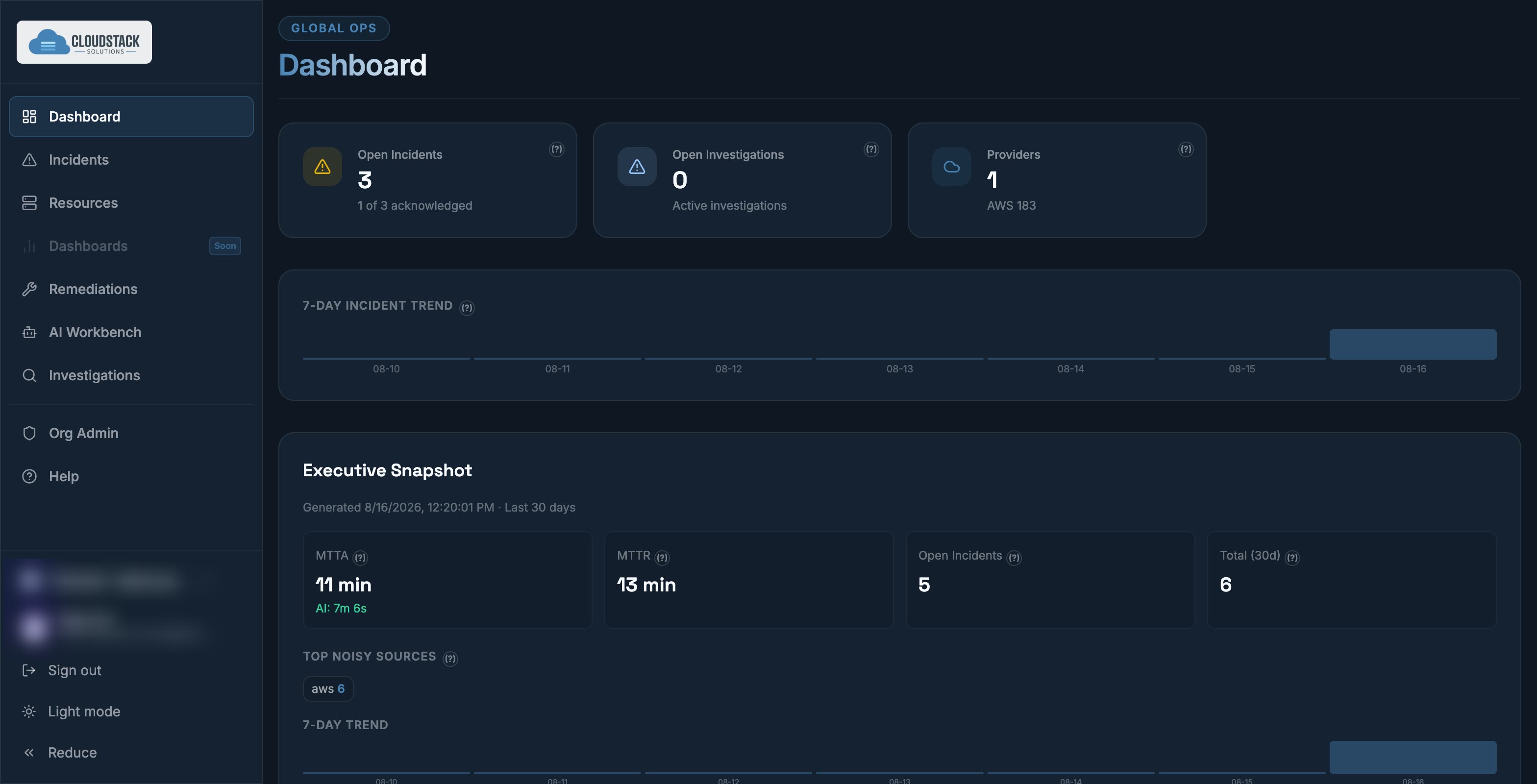
Connect your cloud account and investigate your alerts — without installing agents. AWS today, with GCP and Azure on the roadmap. No collectors to maintain, no metric store to provision. Point Razor at your account with scoped credentials and it begins pulling alarms immediately. Nothing runs inside your workloads.

Read-only credentials are enough to start.

razor.cloudstacksolutions.io/incidents
Razor dashboard showing open incidents, active investigations, and a connected AWS provider minutes after setup.
02

Finds the root cause, not the symptom

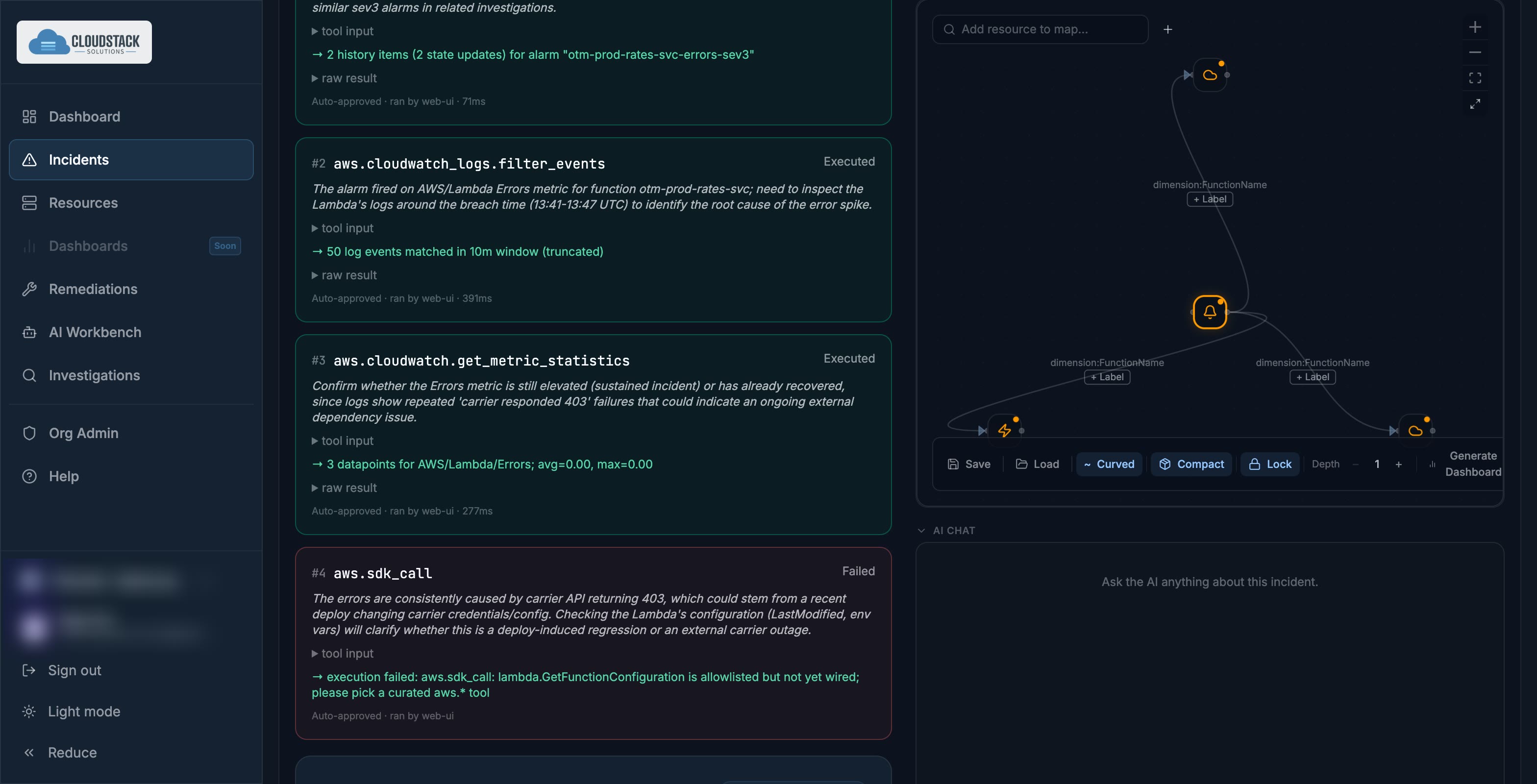
Razor reviews active alerts on a configurable cadence, correlating across accounts and resource tags. Each investigation is a transparent chain of provider API calls you can inspect step by step — alarm history, log filters, metric statistics — not a black box that emits a verdict.

Instead of forty alerts, you get one incident with a supported explanation.

razor.cloudstacksolutions.io/incidents/investigation
Animated investigation run: real AWS tool calls executing in sequence, with the AI adapting when one fails.
03

Proposes a specific fix — you approve in one click

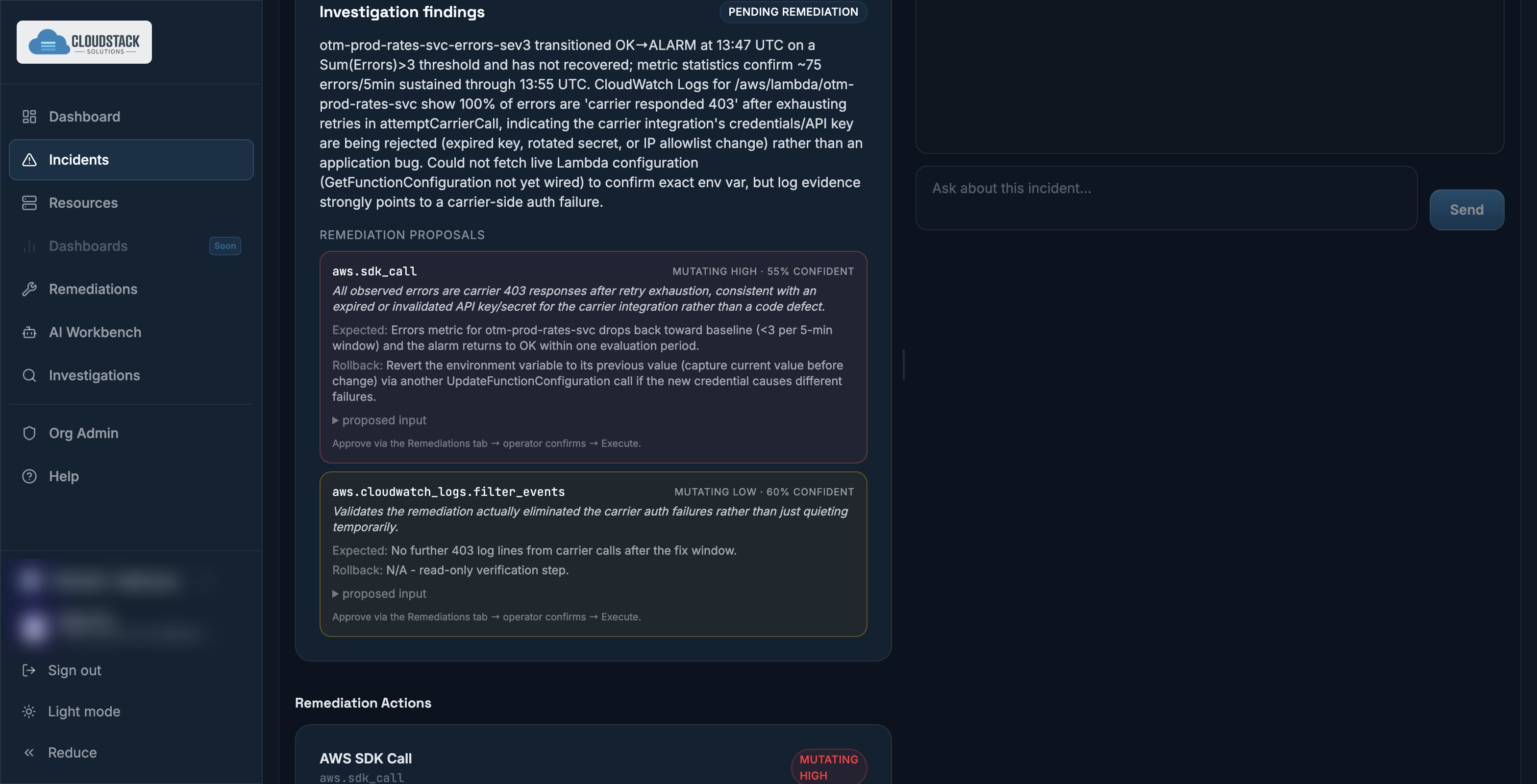
Analysis ends in an action, not an observation. Roll back the deployment. Block the traffic pattern. Revert the config change. Each recommendation arrives scoped, explained, risk-rated, and paired with recovery guidance that says whether, and how, it can be reversed. Approve, and Razor executes it through the provider’s own APIs under your credentials.

The loop that used to span four consoles and thirty minutes closes in a single decision.

razor.cloudstacksolutions.io/incidents/remediation
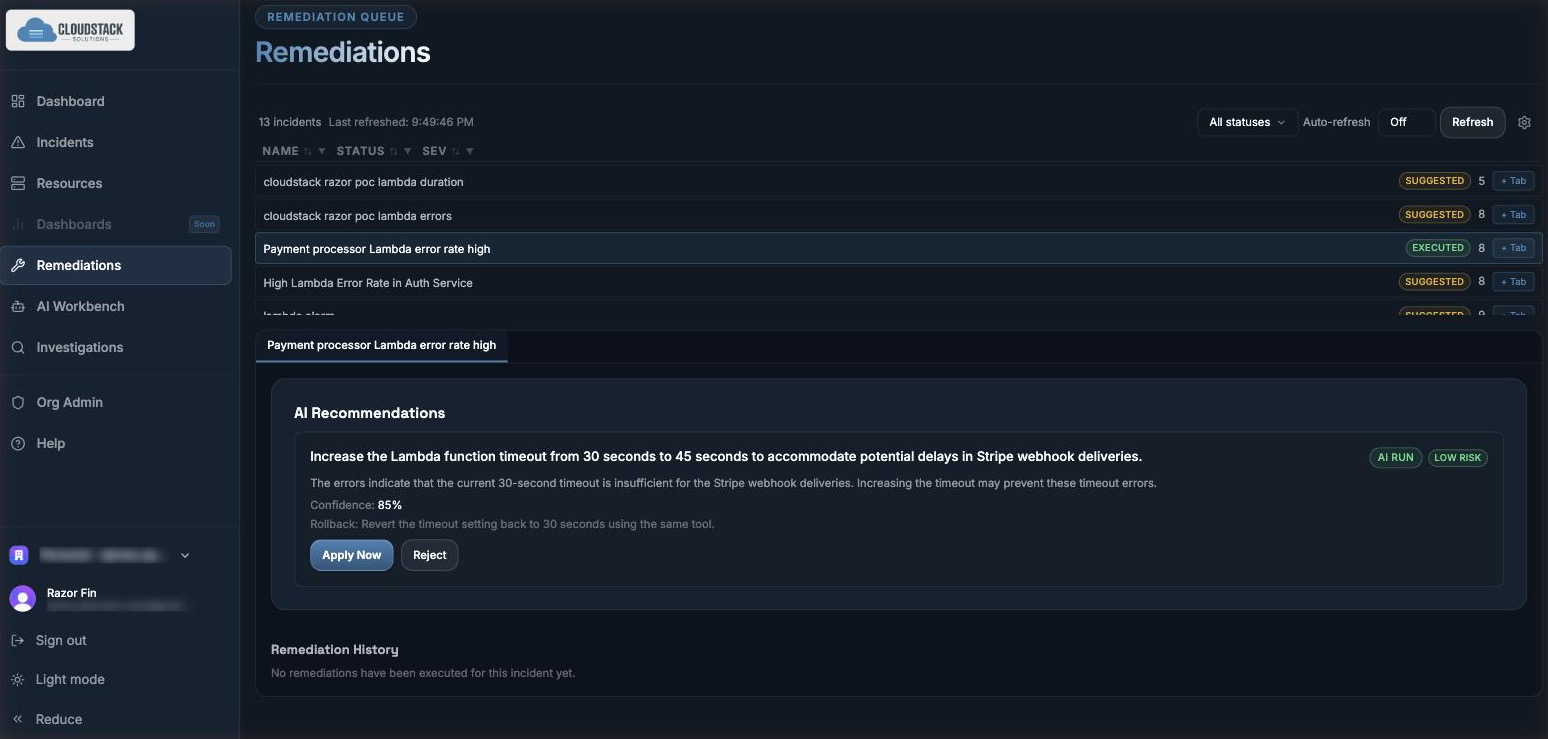
Investigation findings with remediation proposals, confidence scores, risk labels, and an approve and execute action.
04

Builds the view around the incident

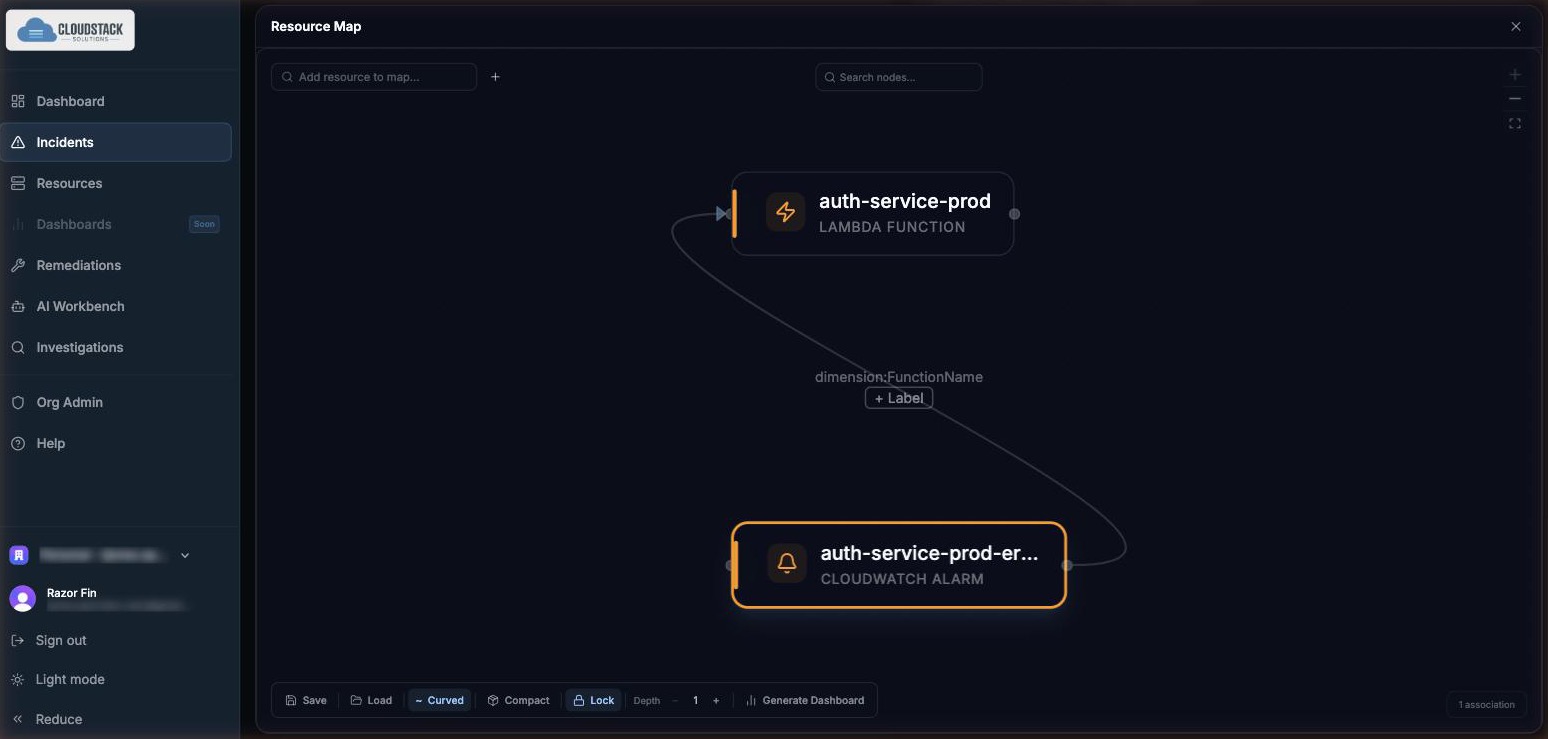
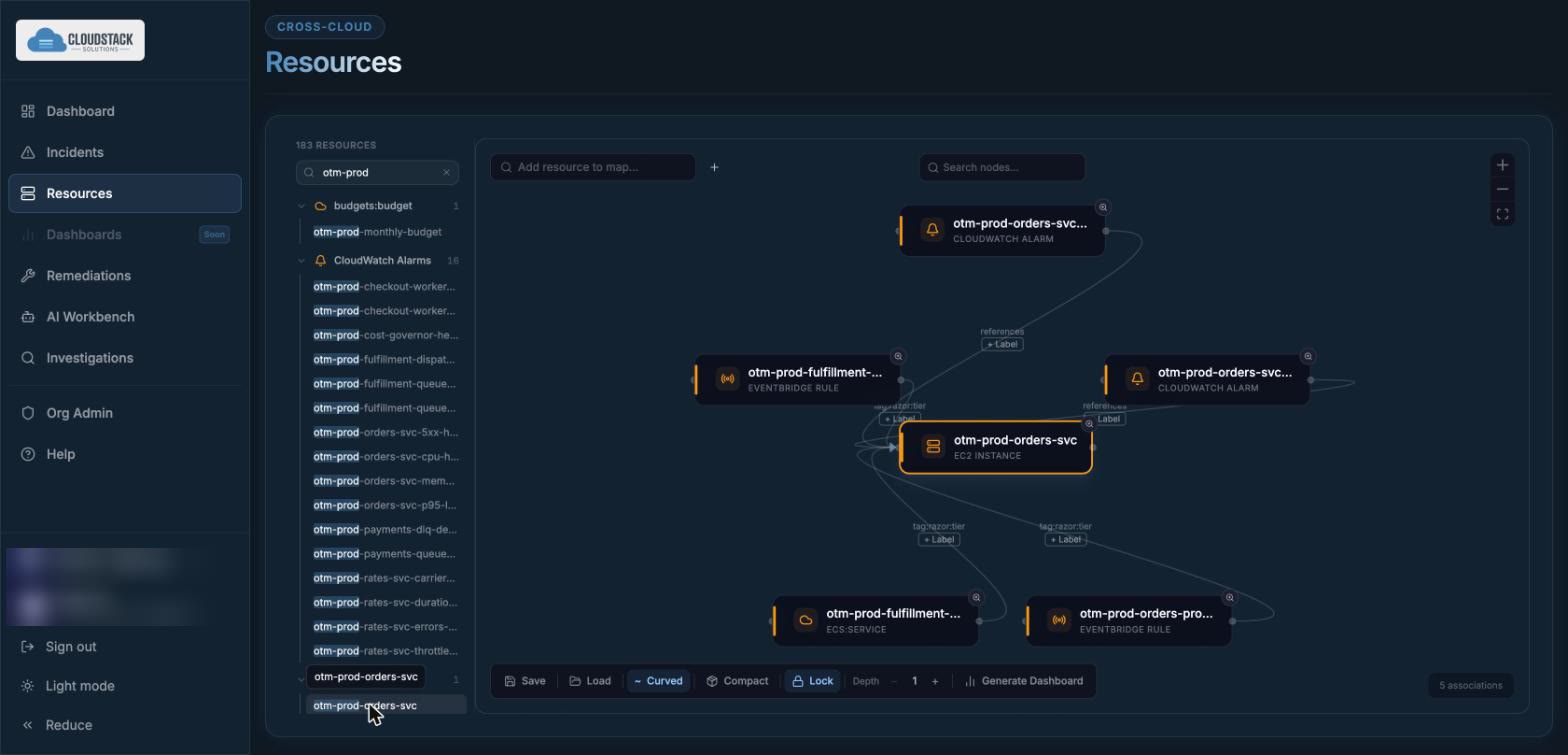
Rather than forcing your incident into a pre-built dashboard, Razor assembles the relevant view for the situation at hand — a live resource map derived from the relationships between the cloud resources themselves, with the metrics that matter for this resource type, pulled from the provider rather than from a stale copy.

Add custom nodes and save the graph. Dashboard generation is coming soon.

razor.cloudstacksolutions.io/incidents/resource-map
Expanded resource map showing a Lambda function and CloudWatch alarm linked by automatically derived relationships.
05

Handles more than one thing going wrong

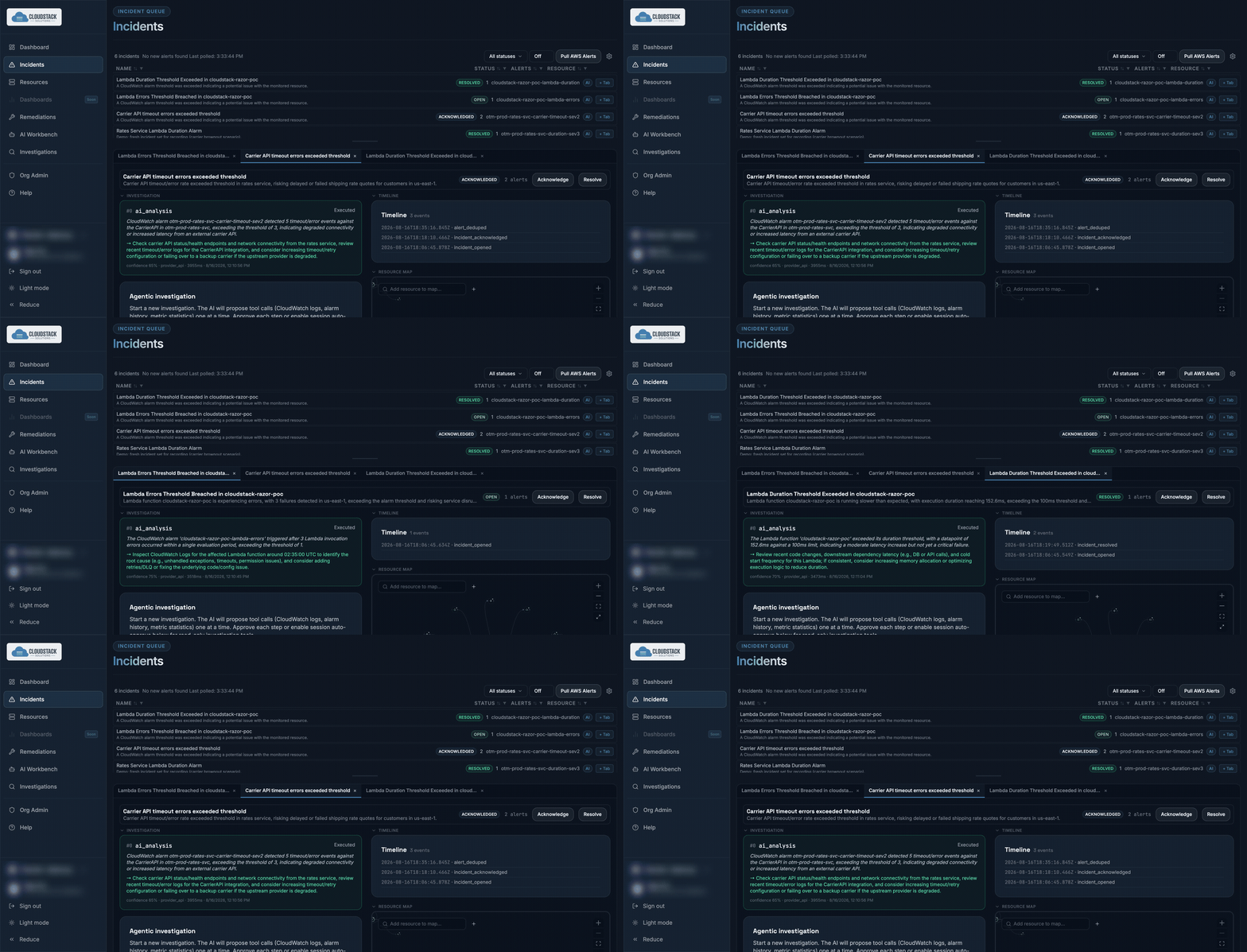
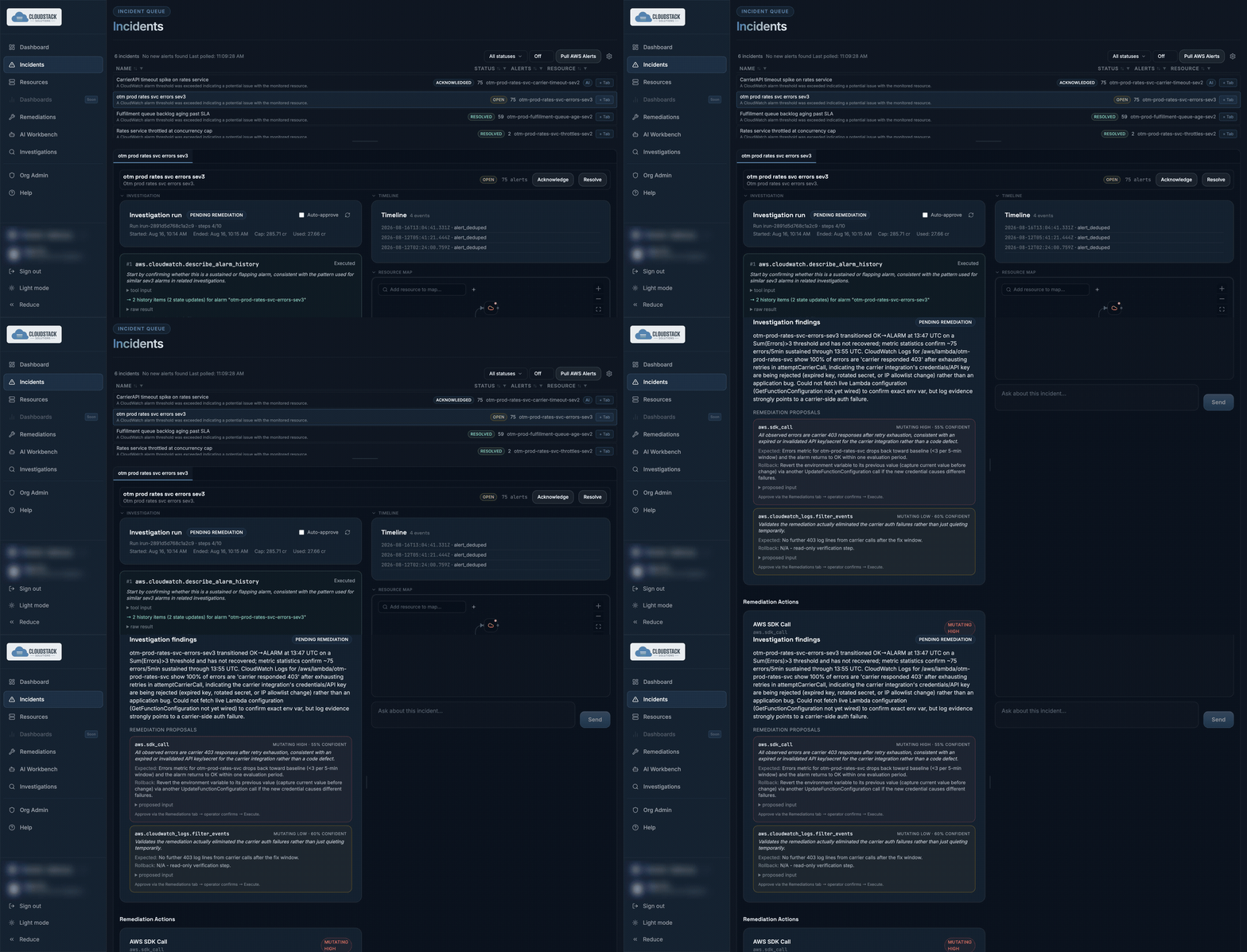
Real incidents rarely arrive alone. Razor gives each one its own tab, with its own investigation, timeline, resource map, and context-aware chat — so an engineer can hold several threads at once without losing the state of any of them.

One tab per incident. Nothing gets dropped when the second page arrives.

razor.cloudstacksolutions.io/incidents?tabs=2
Animated: three incident workspaces open in tabs, each holding its own investigation state.
The product

What you actually
get to work with.

Seven surfaces, one loop. Screenshots are the running product, not mockups.

01Incident queue

Every alarm your clouds raise, collapsed into incidents

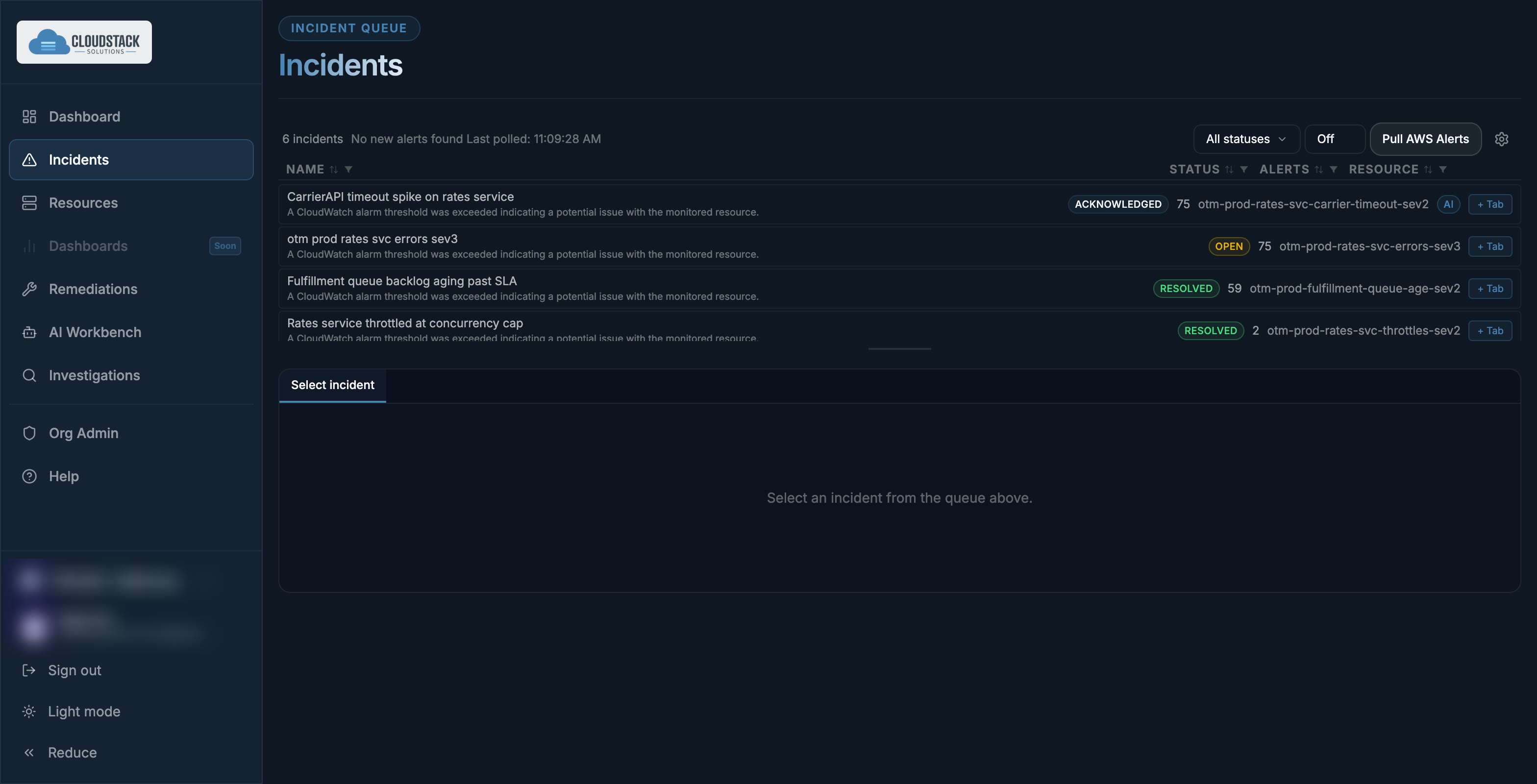
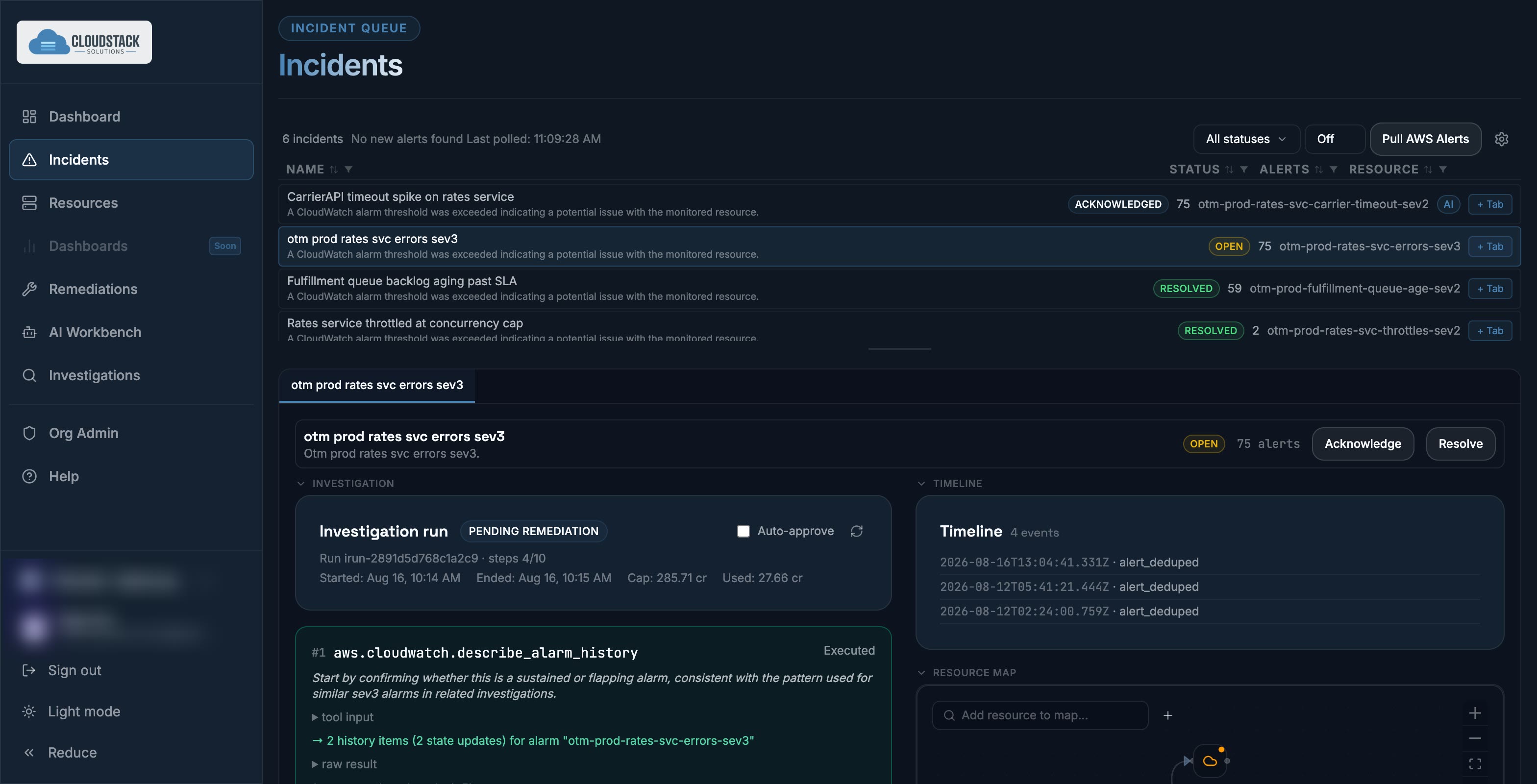
Razor pulls alarms through provider APIs on a cadence you set and groups them into incidents rather than a flat firehose. Each row carries its live status, its alert count, and the resource it belongs to — so triage starts from a decision, not a reading exercise.

razor.cloudstacksolutions.io/incidents
Razor incident queue showing open incidents with alert counts, statuses and the underlying CloudWatch alarm detail.
02Investigation

The reasoning is a chain you can audit, not a verdict

Every investigation is a numbered sequence of real provider API calls — alarm history, log filters, metric statistics — each with the reason it was chosen, its raw result, and how long it took. When Razor concludes something, you can read exactly what it looked at to get there.

razor.cloudstacksolutions.io/investigations
An investigation run showing sequential CloudWatch API calls, each with reasoning, followed by findings and a remediation proposal.
03Remediation

A specific fix, with its recovery path stated

Analysis ends in an action. Not "investigate the timeout" — raise this function's timeout from 30 to 45 seconds, because Stripe webhook deliveries are exceeding it. Every proposal carries a confidence score, a risk classification, and recovery guidance — the rollback steps where reversal is available, and a clear flag where it is not or is uncertain. Approve, reject, or leave it.

razor.cloudstacksolutions.io/remediations
A remediation recommendation to raise a Lambda timeout, with reasoning, 85% confidence, low risk classification, rollback instructions and approve or reject actions.
04Resource map

The topology derived from your cloud, not drawn by hand

Razor builds the graph around an incident from the relationships the provider already knows about — this alarm watches that function, on this dimension. Add your own nodes and edges where the provider has no opinion, and save the layout. Generating a dashboard straight from the graph is coming soon.

razor.cloudstacksolutions.io/incidents · resource map
An expanded resource map showing a Lambda function linked to its CloudWatch alarm by a derived FunctionName dimension relationship.
05AI Workbench

Ask across the whole environment, not one dashboard

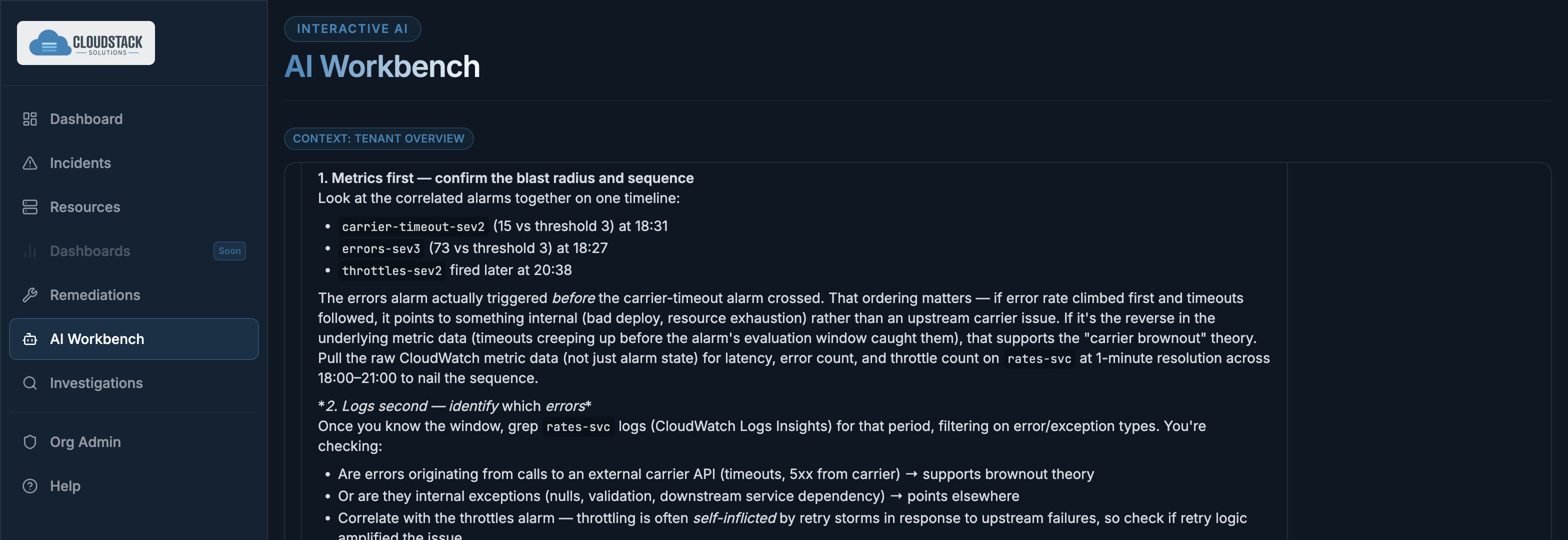
A question box with your infrastructure as context. Ask why a function is at risk and Razor answers from live provider state — and volunteers the related resource you did not ask about, because it can see the whole account rather than the one service someone had time to instrument.

razor.cloudstacksolutions.io/ai-workbench
AI Workbench correlating three alarms by their firing order and recommending an investigation sequence.
06Parallel triage

Real incidents never arrive one at a time

Each incident gets its own tab, holding its own investigation, timeline, resource map and context-aware chat. An engineer can carry several threads at once without losing the state of any of them when the second page arrives.

razor.cloudstacksolutions.io/incidents
An incident workspace open in its own tab: investigation, timeline, and resource map held together.
07Model choice

Pick the model that runs your investigations

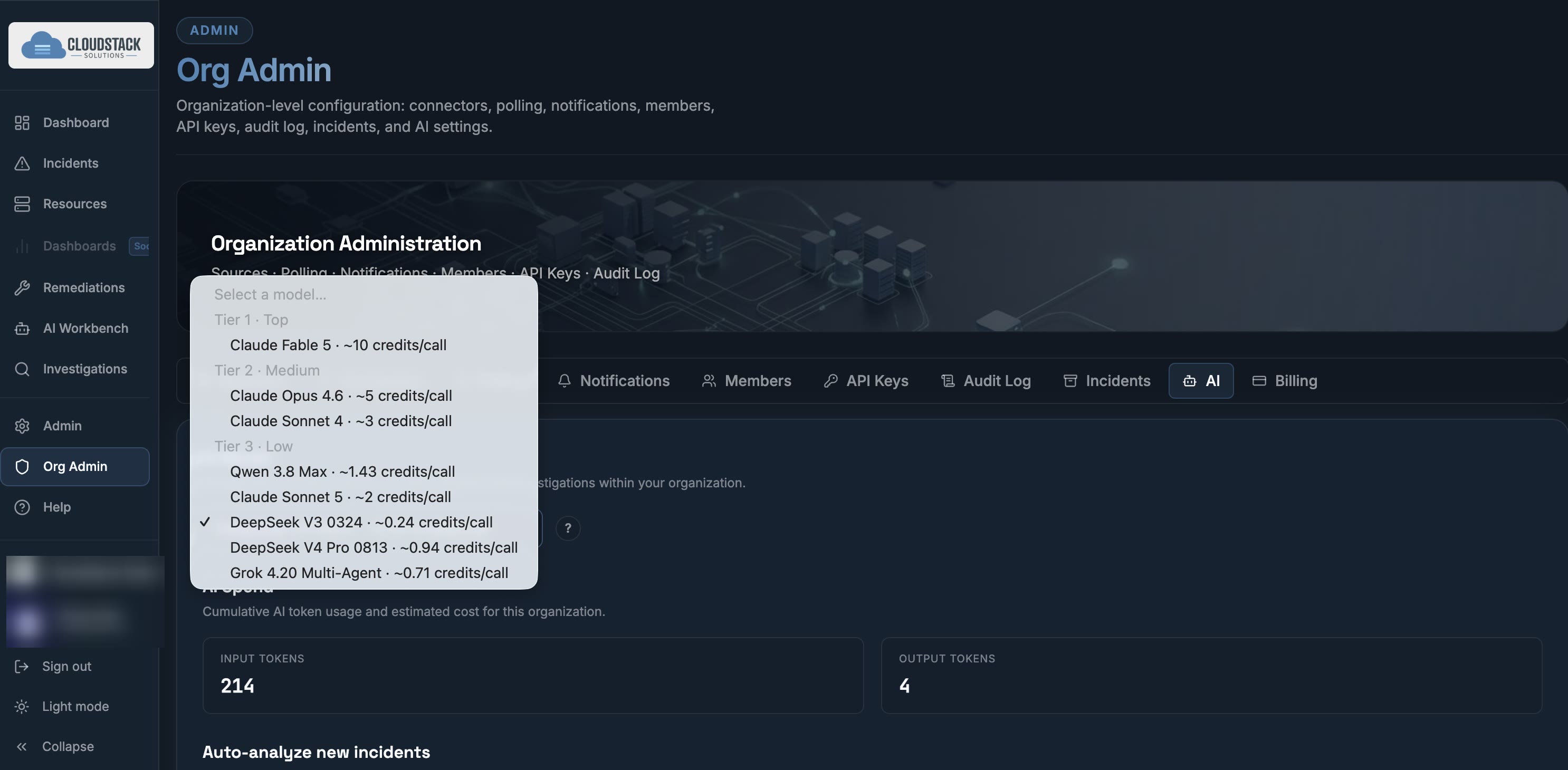
Choose the AI behind your investigations from a tier-grouped, multi-provider list, with the per-call cost in Razor AI credits shown before you pick, so admins can see what each model uses before anyone runs it. Bring-your-own key and model is on the roadmap; today the choice runs through our gateway.

razor.cloudstacksolutions.io · settings
Model picker grouped by capability tier across providers, showing per-call credit cost for each model.
Trust model

AI that can change infrastructure has to earn it.

Razor’s safety model is a design constraint, not a setting. Your team moves faster without handing an AI the keys.

The design principle: Razor should be able to explain what it wants to do, why, and what happens if it’s wrong — before you approve.

Safe Mode by default

Risky actions require explicit approval. Nothing destructive is autonomous out of the box.

Least-privilege IAM

You decide what Razor can see and do — the credentials you provide carry your IAM policies, so permissions and allowed actions are set, scoped, and revocable on your side.

Approval and execution history

Remediation approvals and executions are recorded — who approved what, and when — so the changes Razor made stay reviewable.

Tenant isolation

Enforced across organisations at the data layer.

Who builds it

If you had a DevOps architect on every team, you wouldn’t need Razor.

You don’t. Almost nobody does. That’s the point.

Razor is built, managed, and maintained by DevOps architects with more than 25 years in software development, observability, and remediation — long enough to have watched every wave of tooling since promise to close this same loop.

Seasoned enough to remember when this discipline was called Event Detection and Notification.

Hiring that judgment is the hard part. The market for genuinely senior DevOps engineers is thin, expensive, and slow — and the ones you do land spend their first months learning your environment before they are any use at 3am.

Razor is that experience, encoded. Available on the first day, on every incident, at the same standard every time.

25+Years in software development, observability, and remediation
24/7Same standard at 3am on a holiday weekend as Tuesday at noon
Day 1No ramp-up period learning your environment

You have a problem finding high-quality, experienced DevOps engineers. Razor becomes that engineer.
Differentiation

How Razor differs

Razor does not ask you to replace your stack. It occupies the gap the rest of the category leaves open.

CapabilityRazorCloud provider
AI ops
Dashboards
No agents or instrumentation requiredProvider guidance expects agents, container insights and tracing services
No telemetry ingest or storage cost
Your telemetry is never used to train modelsProvider tooling may use investigation content for service improvement unless you opt out
No fixed monthly investigation-count limitCredit availability and configured usage controls apply. Provider tooling caps AI investigations at 150 per account each month, 2 concurrent
Proposes a specific, scoped fix
Recovery guidance attached to every proposalProvider rollback depends on what the runbook author wrote
Executes the remediation on approval
Multi-tenant isolation for many estatesProvider tooling is scoped to one investigation group per account
Yes Partial NoVerified against vendor documentation, August 2026

vs. dashboards

Datadog, Grafana, Splunk

They show you what happened. Razor tells you why, and offers the fix. Razor is a layer above them, not a replacement.

vs. cloud provider native AI ops

Cloud provider investigations and DevOps agents

The closest analogues, and the ones worth taking seriously — both investigate well and both execute on approval. What they ask for in return is instrumentation: agents to deploy, tracing and signal services to enable, and the ingest bill underneath all of it. Then they cap how many investigations you can run and keep the telemetry in their own store. Razor reads your control plane directly — nothing to install, nothing to maintain, and no fixed monthly investigation-count limit — credit availability and your configured usage controls apply.

vs. runbook automation

Rundeck, Ansible, custom scripts

Runbooks execute what you already anticipated. Razor reasons about the incidents you didn’t.

Roadmap

What’s next

Razor runs against AWS today. Everything below is committed work in progress, not speculation — design partners help set the order.

The big one

IaC-aware remediation

Razor already knows what your infrastructure is. Next it learns what your infrastructure is supposed to be — reading your Terraform alongside the running resources, so a remediation lands as a pull request against the code that owns the resource, not a console change your next apply quietly reverts.

Human in the loop by default. Razor opens the PR; your engineers review it.

Whether that review stays mandatory is a decision that belongs to you and your security team, not to us — so the gates are configurable rather than assumed. The state of the art is moving faster than any ops team can track. Keeping pace with it is our job, and handing you the controls is the whole point.

Additional cloud support

GCP and Azure alongside AWS. The ingestion and correlation layers are already provider-agnostic — adding a provider is an integration, not a rewrite.

Dynamic dashboards

Generate a dashboard from a resource map or an incident, assembled for the resources actually involved rather than picked from a template.

Metrics and reporting

MTTR trends, remediation acceptance rates, and incident volume over time — the evidence you need for a renewal conversation or an audit.

Bring your own key and model

Supply your own AI gateway key and choose the model behind your investigations, so inference runs on your account under your terms.

MCP server

Expose Razor’s incidents, investigations, and remediations to your own agents and tooling over the Model Context Protocol.

Correlated-incident fan-out

Follow an investigation across related incidents rather than treating each in isolation, weighting evidence by what previous investigations established.

Roadmap shown for direction. Sequence and timing are not commitments.

Pricing

A base fee, with AI credits included

Every plan includes a monthly allowance of Razor AI credits. Bigger plans include more. There is no fixed monthly limit on how many investigations you run; credit availability and the usage controls you configure apply.

PlanCloud resourcesBase priceIncluded AI credits
Entry0–250$20 /mo125
Growth251–500$100 /mo625
Scale501–1,000$250 /mo1,600
Custom1,001+Talk to us for a quote

What an investigation uses

Initial measurements put an investigation on Sonnet 5 at about 6–10 credits. Larger incidents can use more. The model you pick changes the cost, and Razor shows each model's credit cost before you choose it.

After your included credits

Once the month's included credits are used, you can keep going pay-as-you-go at $0.40 per credit. During the beta, pay-as-you-go is switched on for your account by the Razor team; until it is, usage pauses at your included credits.

Prepaid credit bundles

Coming soon Buy credits ahead at $0.20 per credit, half the pay-as-you-go price.

Getting started

Start read-only.
Expand when it’s earned.

Built for mid-market and regulated organisations running real multi-cloud footprints with lean CloudOps and SecOps teams — where alert fatigue, slow remediation, and audit pressure all land on the same few people.

01

Connect

Scoped credentials for one account. Read-only is enough to start.

02

Observe

Razor ingests and begins correlating. No configuration required.

03

Enable remediation

When the recommendations have earned your trust, turn on one-click execution — one permission tier at a time.

Your dashboards will never give you the answer.

Closed beta is open now, with open beta in Q4 2026 and general availability in Q1 2027. Closed beta partners get a walkthrough against their own environment, direct access to the team building it, and design-partner pricing that carries past GA.

Places are limited by how many environments we can support well.

Closed beta · now open

Request access

Places are limited by how many environments we can support well. Tell us about yours and we’ll tell you honestly whether Razor helps yet.

Razor runs on AWS today. GCP and Azure are on the roadmap — tell us anyway, it shapes the order.

We use this only to evaluate beta fit and reply to you. No newsletter, no sharing.

Cloudstack Solutionsrazor.cloudstacksolutions.io